Pterodactyl Panel Alternative for Local Game Server Hosting | HTN Panel
Looking for a Pterodactyl panel alternative? HTN Panel is a modern game server control panel built for simple local game server hosting from your own PC.
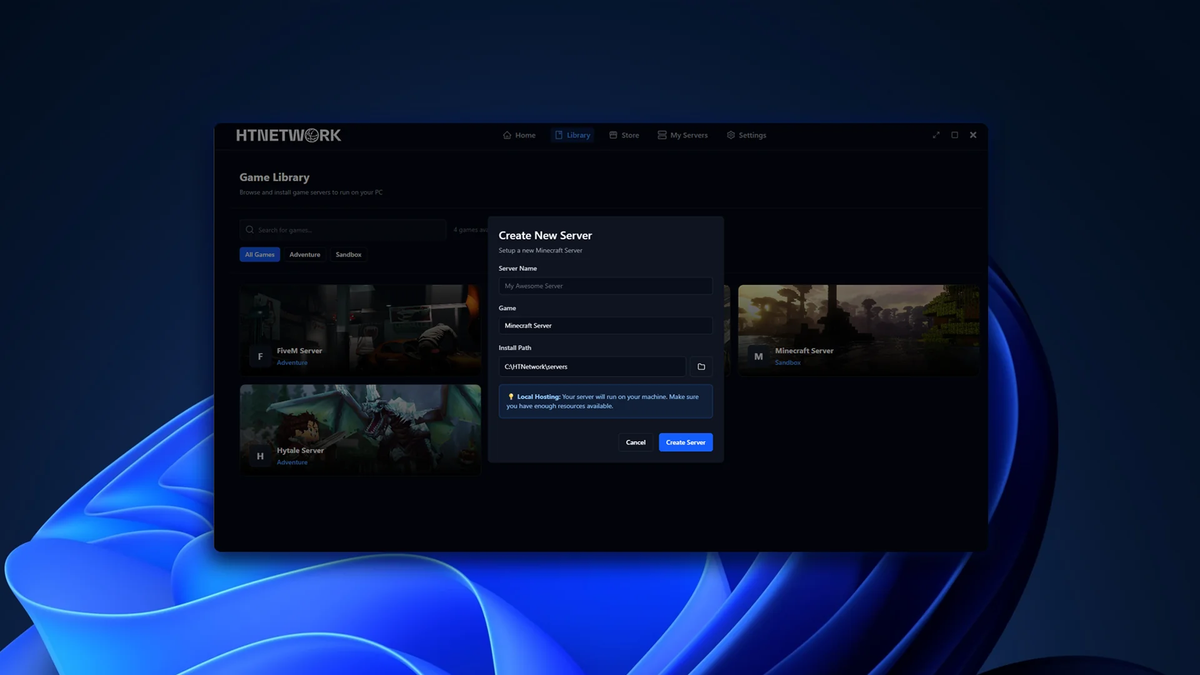
Pterodactyl Panel Alternative for Local Game Server Hosting
If you are searching for a Pterodactyl panel, you are probably looking for a way to host and manage game servers with more control.
Pterodactyl is a popular name in the game server hosting world, especially with hosting providers, developers, and technical users.
But for everyday users who simply want to host a game server from their own PC, Pterodactyl can be more complicated than it needs to be.
Setting up Pterodactyl often means dealing with servers, nodes, Wings, Docker, databases, web servers, permissions, and Linux knowledge.
That might make sense for hosting companies or advanced users.
But if you just want to host Minecraft, FiveM, BeamMP, ETS2, ATS, RedM, or another game locally from your own PC, you probably want something simpler.
That is exactly why we built HTN Panel.
HTN Panel is a modern game server control panel designed to make local game server hosting simple, clean, and beginner-friendly.
Instead of setting up a full hosting environment, HTN Panel lets you host supported game servers locally from your own PC through a modern app-style panel.
Download HTN Panel here:
https://panel.htnetwork.one/
View supported games here:
https://panel.htnetwork.one/store
What Is Pterodactyl Panel?
Pterodactyl is a free, open-source game server management panel.
It is commonly used by hosting companies, server providers, developers, and technical users who want to manage multiple game servers through a web panel.
It is powerful, but it is not always simple.
Pterodactyl is usually designed around a more advanced hosting setup. It is often used with separate nodes, server environments, Docker containers, Wings, databases, and web server configuration.
For users who already understand that setup, Pterodactyl can be useful.
But for beginners or local hosts, it can feel overwhelming.
What Is HTN Panel?
HTN Panel is a modern local game server panel built for users who want to host game servers from their own PC.
It gives you a clean way to deploy, manage, monitor, back up, and control supported game servers locally.
The goal is simple:
Make self-hosting game servers easier for normal users.
Instead of needing to install and configure a full Pterodactyl setup, HTN Panel gives you a much simpler way to run a game server from your own machine.
You install HTN Panel, choose a supported game, deploy your server, and manage it from one modern interface.
Why Look for a Pterodactyl Panel Alternative?
Pterodactyl is powerful, but it is not always the right tool for every user.
A lot of people searching for a Pterodactyl alternative are not trying to run a hosting company.
They are just trying to host a game server.
They want something that is:
- Easier to install
- Easier to understand
- More beginner-friendly
- Better suited for local hosting
- Less technical
- Cleaner to use day-to-day
- Built for hosting from their own PC
That is where HTN Panel fits in.
HTN Panel is not trying to replace Pterodactyl for hosting providers running large infrastructure.
It is built for users who want the benefits of a game server control panel without needing the complexity of a full hosting stack.
Pterodactyl Panel vs HTN Panel
| Feature | Pterodactyl Panel | HTN Panel |
|---|---|---|
| Main use case | ⚠️ Advanced game server management and hosting environments | ✅ Modern local game server hosting from your own PC |
| Setup difficulty | ❌ Technical setup with more moving parts | ✅ Built to be simple for everyday users |
| Beginner friendly | ❌ Can be overwhelming for new users | ✅ Yes |
| Local hosting focus | ⚠️ Possible, but not the main focus | ✅ Yes, built around local hosting |
| Requires Linux/server admin knowledge | ❌ Often yes | ✅ No advanced server admin knowledge needed |
| Requires Docker/Wings setup | ❌ Yes, for a proper Pterodactyl environment | ✅ No Pterodactyl-style node setup required |
| Game deployment | ⚠️ Powerful, but requires proper setup/templates | ✅ Simple game deployment through the panel |
| File manager | ✅ Yes | ✅ Yes |
| Server monitoring | ✅ Yes | ✅ Yes |
| Built-in backups | ⚠️ Available depending on setup | ✅ Built into HTN Panel |
| Remote access for team members | ⚠️ User access exists, but setup is more technical | ✅ Built into the HTN Panel experience |
| Best for | ⚠️ Hosting providers, developers, and advanced users | ✅ Gamers, beginners, communities, and local hosts |
Why Pterodactyl Can Be Too Complicated for Local Hosting
Pterodactyl is not a bad panel.
It is just not built for the same type of user as HTN Panel.
Pterodactyl makes more sense if you are running a hosting company, managing multiple nodes, or building a proper server infrastructure setup.
But if you are hosting from your own PC, that can be overkill.
For local hosting, many users do not want to deal with:
- Linux server setup
- Docker containers
- Wings configuration
- Web server setup
- Database setup
- Node configuration
- SSL setup
- Panel-to-node communication
- Permissions and server environment issues
That is a lot just to host a game server.
HTN Panel removes that complexity by focusing on local hosting from the start.
Why HTN Panel Is a Better Fit for Local Game Server Hosting
HTN Panel is built for people who want to host game servers from their own PC without turning it into a full server administration project.
You do not need to build a hosting platform.
You do not need to manage nodes.
You do not need to set up a Pterodactyl environment.
You just need a clean panel that helps you deploy and manage your game server.
That is exactly what HTN Panel does.
It gives you the tools you need in a simpler, more modern local hosting experience.
Key Features of HTN Panel
1. Host Game Servers From Your Own PC
HTN Panel lets you host supported game servers locally from your own computer.
This means you can use the hardware you already own instead of renting a hosted game server every month.
For many users, this makes game server hosting cheaper and more flexible.
You stay in control of your server, your files, your setup, and your machine.
2. Simple Game Server Deployment
Manual server setup can be frustrating.
You may need to download files, create folders, edit configs, run commands, set up ports, and troubleshoot errors before your server is even online.
HTN Panel simplifies this.
Choose a supported game, deploy it through the panel, and manage it from one modern interface.
3. Built-In File Manager
A proper game server control panel needs a proper file manager.
HTN Panel includes a built-in file manager so you can manage your server files directly through the panel.
This is useful for:
- Editing config files
- Uploading resources
- Managing worlds
- Changing server settings
- Organising folders
- Updating server files
Instead of digging around your PC manually, you can manage your game server files from inside HTN Panel.
4. Built-In Backups
Backups are essential for game servers.
If a world corrupts, a resource breaks, or a config change causes problems, having a backup can save your server.
HTN Panel includes backups as part of the local hosting experience, making it easier to protect your files.
This is especially useful for Minecraft worlds, FiveM resources, BeamMP configs, ETS2 servers, ATS servers, RedM servers, and any game where your files matter.
5. Server Monitoring
HTN Panel helps you monitor your server from inside the panel.
You can keep track of your server status and manage it without needing to rely on separate tools or manual checks.
For local hosting, this makes day-to-day server management much easier.
6. Start, Stop, and Restart Servers Easily
One of the main reasons people use a game server panel is to make server control easier.
HTN Panel lets you start, stop, and restart supported game servers through the panel.
No messy commands.
No hunting through folders.
No complicated setup just to restart your server.
7. Remote Access for Trusted Users
One of the biggest challenges with local hosting is letting other people help manage your server.
If the server is running from your PC, you do not want to give people full access to your whole machine.
HTN Panel solves this with remote access features.
You can allow trusted users to help manage your server without giving them direct access to your PC.
This is useful for:
- Friends
- Developers
- Server staff
- Community managers
- Co-owners
For communities, this is a huge advantage.
You can host locally while still letting the right people help manage the server remotely.
8. A Modern Local Hosting Experience
Game server panels should not feel more complicated than the server itself.
HTN Panel is designed to feel modern, simple, and easy to use.
The goal is to make local game server hosting feel accessible to normal users, not just people with server admin experience.
Traditional Game Hosting vs Pterodactyl Panel vs HTN Panel
| Feature | Traditional Game Hosting | Pterodactyl Panel | HTN Panel |
|---|---|---|---|
| Host from your own PC | ❌ No | ⚠️ Possible, but technical | ✅ Yes |
| Monthly hosting fee | ❌ Usually yes | ✅ No panel licence fee, but infrastructure is still needed | ✅ No traditional hosting fee for local hosting |
| Setup difficulty | ✅ Usually handled by the host | ❌ Requires technical knowledge | ✅ Built to be simple |
| Beginner friendly | ⚠️ Simple, but limited | ❌ Can be overwhelming | ✅ Yes |
| Full hardware control | ❌ No | ✅ Yes, depending on your infrastructure | ✅ Yes |
| File manager | ⚠️ Usually yes | ✅ Yes | ✅ Yes |
| Backups | ⚠️ Often limited or paid | ⚠️ Available depending on setup | ✅ Built in |
| Remote team access | ⚠️ Usually via host panel | ⚠️ Possible, but requires proper setup | ✅ Built in |
| Local-first design | ❌ No | ⚠️ Not the main focus | ✅ Yes |
| Best for | Managed hosting users | Technical users and hosting providers | ✅ Simple local hosting |
Is HTN Panel Better Than Pterodactyl?
For local game server hosting, HTN Panel is the easier and more beginner-friendly option.
Pterodactyl is powerful, but it is built for a more technical environment.
If you are running a hosting company or managing multiple dedicated servers, Pterodactyl may make sense.
But if you are an everyday user who wants to host game servers from your own PC, HTN Panel is much easier to approach.
Choose HTN Panel if you want:
- A modern local game server panel
- Easier setup
- A cleaner interface
- Game server hosting from your own PC
- Built-in file management
- Built-in backups
- Server monitoring
- Remote access for trusted users
- A panel made for gamers and communities
Supported Games on HTN Panel
HTN Panel supports a growing range of popular games, with more being added over time.
You can browse the full HTN Panel store here:
https://panel.htnetwork.one/store
Popular HTN Panel game pages include:
Minecraft:
https://panel.htnetwork.one/store/minecraft
FiveM:
https://panel.htnetwork.one/store/fivem
BeamMP:
https://panel.htnetwork.one/store/beammp
Euro Truck Simulator 2:
https://panel.htnetwork.one/store/ets2
American Truck Simulator:
https://panel.htnetwork.one/store/ats
RedM:
https://panel.htnetwork.one/store/redm
Whether you are hosting a Minecraft world, FiveM roleplay server, BeamMP session, or simulator community, HTN Panel gives you a simpler way to host locally.
Pterodactyl Alternative for Minecraft Servers
Many people searching for Pterodactyl are trying to host a Minecraft server.
Pterodactyl can work well for Minecraft, especially in hosted environments, but it can be too much for users who just want a local server from their own PC.
HTN Panel gives Minecraft users a simpler way to host and manage a server locally.
You can deploy your server, manage files, monitor it, back it up, and control it from one panel.
View Minecraft on HTN Panel:
https://panel.htnetwork.one/store/minecraft
Pterodactyl Alternative for FiveM Servers
FiveM server owners often need a reliable way to manage resources, configs, files, and restarts.
Pterodactyl is powerful, but it may be more complex than needed for local testing, development, or small community hosting.
HTN Panel gives FiveM users a local game server control panel designed to make server management easier.
View FiveM on HTN Panel:
https://panel.htnetwork.one/store/fivem
Pterodactyl Alternative for BeamMP Servers
BeamMP is another strong use case for local hosting.
With HTN Panel, you can host and manage a BeamMP server locally from your own PC without needing a complicated panel setup.
View BeamMP on HTN Panel:
https://panel.htnetwork.one/store/beammp
Pterodactyl Alternative for ETS2 and ATS Servers
Euro Truck Simulator 2 and American Truck Simulator communities can also benefit from a simpler local hosting setup.
HTN Panel makes it easier to manage simulator servers from your own PC through a clean local game server panel.
View ETS2 on HTN Panel:
https://panel.htnetwork.one/store/ets2
View ATS on HTN Panel:
https://panel.htnetwork.one/store/ats
Who Should Use HTN Panel?
HTN Panel is ideal for:
- Gamers hosting private servers for friends
- Minecraft players who want to self-host
- FiveM owners testing or building locally
- BeamMP players hosting sessions
- ETS2 and ATS communities
- RedM server owners
- Developers testing game servers
- Small communities wanting to reduce monthly hosting costs
- Users looking for a Pterodactyl alternative
- Anyone searching for a modern game server control panel
If you want to host a game server from your own PC and manage it through a clean panel, HTN Panel is built for you.
Why Local Game Server Panels Are Becoming More Popular
More server owners are looking for ways to reduce costs and gain more control.
Traditional game hosting is convenient, but it usually means paying every month.
Pterodactyl gives advanced users control, but it can also add complexity.
A local game server panel gives everyday users a better middle ground.
You can host on your own hardware while still using a proper interface to manage your server.
That is why HTN Panel exists.
It makes self-hosting easier for normal users.
Why a Simpler Game Server Control Panel Matters
Game server hosting should not feel harder than the game server itself.
A control panel should make hosting easier.
It should help you get your server online faster, manage files more easily, protect your setup with backups, and let trusted people help without needing full access to your PC.
HTN Panel is built around that idea.
It gives users the tools they need without forcing them into a complicated hosting provider-style setup.
Frequently Asked Questions
What is the best Pterodactyl panel alternative?
HTN Panel is a strong Pterodactyl panel alternative for users who want to host game servers locally from their own PC.
It focuses on simple setup, a modern interface, built-in file management, backups, server monitoring, and remote access.
What is a game server control panel?
A game server control panel is software that helps you manage game servers through an interface.
It usually includes tools for starting servers, stopping servers, restarting servers, editing files, monitoring status, managing users, creating backups, and handling server settings.
Can I host game servers on my own PC?
Yes.
HTN Panel lets you host supported game servers locally from your own PC, giving you more control over your files, hardware, and setup.
Is HTN Panel like Pterodactyl?
HTN Panel and Pterodactyl are both related to game server management, but they are built for different users.
Pterodactyl is more technical and often used for hosting environments.
HTN Panel is focused on simple local game server hosting from your own PC.
Is Pterodactyl hard to set up?
Pterodactyl can be difficult for beginners because it usually requires more technical setup than a normal app.
Users may need to deal with Linux, Docker, Wings, nodes, databases, web servers, and server configuration.
HTN Panel is designed to make local hosting easier and more beginner-friendly.
Does HTN Panel support Minecraft?
Yes.
HTN Panel supports Minecraft server hosting.
View the Minecraft page here:
https://panel.htnetwork.one/store/minecraft
Does HTN Panel support FiveM?
Yes.
HTN Panel supports FiveM server hosting.
View the FiveM page here:
https://panel.htnetwork.one/store/fivem
Does HTN Panel support BeamMP?
Yes.
HTN Panel supports BeamMP server hosting.
View the BeamMP page here:
https://panel.htnetwork.one/store/beammp
Do I need monthly game hosting with HTN Panel?
HTN Panel is designed to reduce the need for traditional monthly game hosting by letting you host supported servers locally from your own PC.
Is HTN Panel good for beginners?
Yes.
HTN Panel is built to make local game server hosting easier for everyday users, not just experienced server admins.
Final Thoughts: The Modern Pterodactyl Panel Alternative
If you are searching for a Pterodactyl panel or a game server control panel, HTN Panel is worth checking out.
Pterodactyl is powerful, but it can be too technical for users who simply want to host game servers locally.
HTN Panel is built to be the modern local hosting alternative.
It gives you a cleaner way to host game servers from your own PC, with tools for deployment, file management, backups, monitoring, restarts, and remote access.
For users who want control without complicated setup, HTN Panel makes self-hosted game servers much easier.
Whether you are hosting Minecraft, FiveM, BeamMP, ETS2, ATS, RedM, or another supported game, HTN Panel gives you a simpler way to manage your server locally.
Download HTN Panel here:
https://panel.htnetwork.one/
Browse supported games here:
https://panel.htnetwork.one/store



