Playit Alternative: Run a Server Without Port Forwarding
Want to run a server without port forwarding? You no longer need to dig through router settings just to let your friends join.
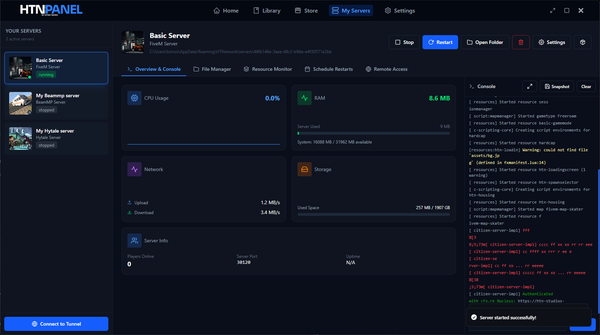
HTNTunnel is built into HTNPanel. For most eligible games available through HTNPanel, you can enable the tunnel at no extra cost, receive a unique connect link and share it with your players. Your game server still runs on your own computer; HTNTunnel provides the public route players use to reach it.
If you searched for Playit because you need a game server tunnel, HTNTunnel offers the same core outcome directly inside the panel you already use to deploy and manage the server.
The quick answer
To run a game server without port forwarding in HTNPanel:
- Deploy or open an eligible game server in HTNPanel.
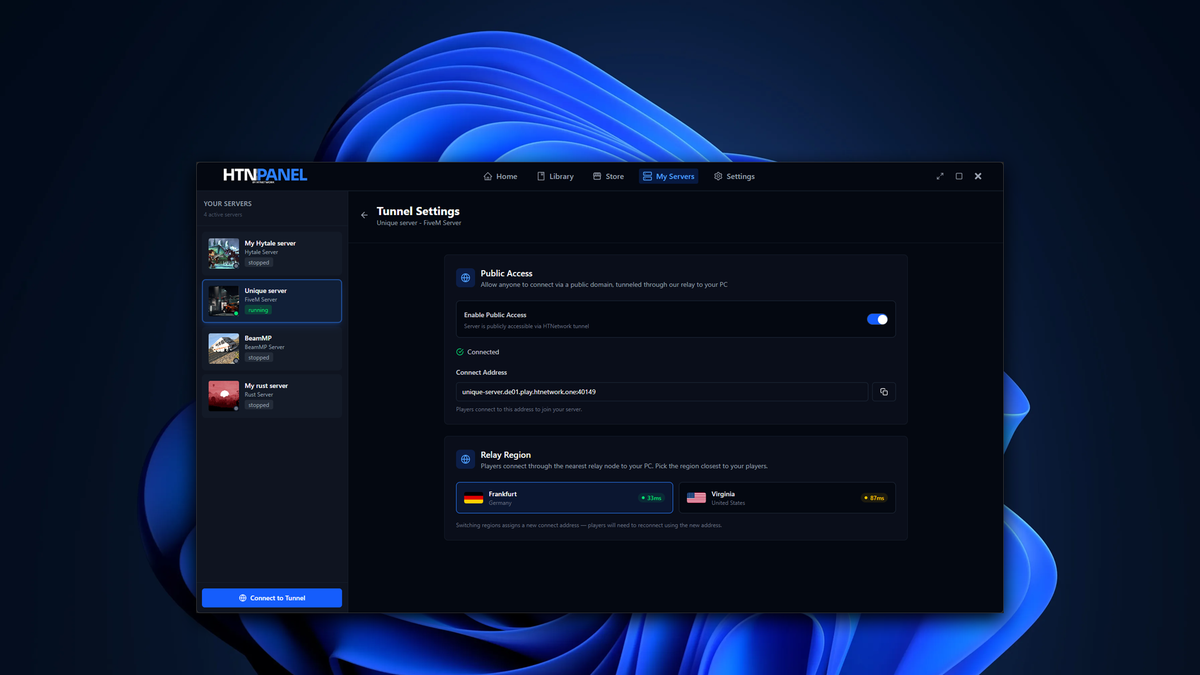
- Enable HTNTunnel for that server.
- Start the server and copy its unique connect link.
- Send the link to the players you want to invite.
That is the complete public-sharing flow. There is no router port-forwarding rule to create.
HTNTunnel availability depends on the game. Check the tunnel option for your server or browse the HTNPanel game store before relying on it for a specific title.
Why game servers normally need port forwarding
A game server running on your PC can accept connections from your local network. Players elsewhere on the internet, however, need a route back to that server.
Port forwarding creates that route through your router. It usually means identifying the ports used by the game, signing in to the router, directing incoming traffic to the correct computer and checking that local firewall rules allow the connection.
That can be awkward when you do not control the router, its interface is unclear or you simply do not want to change network settings. A game server tunnel solves the routing problem differently.
What is a game server tunnel?
A game server tunnel gives players a public connection point and relays their game traffic to the server running on your machine. Players connect through the address or link supplied by the tunnel instead of connecting through a port opened manually on your router.
The important distinction is that the tunnel does not host the game server for you. Your PC still runs the server and needs to remain powered on, connected to the internet and capable of handling the game and its players.
Services such as Playit popularised this approach for self-hosted game servers. HTNTunnel brings the workflow into HTNPanel, alongside the tools used to install and manage the server.
HTNTunnel vs Playit: what is different?
Both approaches are intended to help make a locally hosted game server reachable without conventional port forwarding. The main difference is the setup experience.
| HTNTunnel | Playit | |
|---|---|---|
| Where it is managed | Inside HTNPanel | Through Playit's own agent and setup flow |
| Public connection details | A unique connect link for the server | A public tunnel address |
| Extra setup | Enable it for an eligible HTNPanel server | Install and configure the Playit software or supported integration |
| Game availability | Most eligible games in HTNPanel | Depends on Playit's supported tunnel and game setup |
| HTNPanel cost | Included at no extra cost for most eligible games | Separate service with its own plans and terms |
Playit remains a separate tunnelling service. HTNTunnel is designed for people already using HTNPanel who want server deployment, management and public connectivity in one place.
How to run a server without port forwarding using HTNTunnel
1. Set up the game server in HTNPanel
Install HTNPanel and deploy a supported game server. If you have not chosen a game yet, use the store to check what is currently available rather than assuming every title supports tunnelling.
2. Enable HTNTunnel
Open your server in HTNPanel and switch on HTNTunnel if the option is available for that game. You do not need to create a matching port-forwarding rule on your router.
3. Start the server
The tunnel provides connectivity; it does not replace the game server itself. Make sure the server is running successfully in HTNPanel before asking anyone to connect.
4. Share the unique connect link
Copy the connect link generated for your server and send it to your players. They use those connection details to reach the server through HTNTunnel.
5. Test it from outside your home network
Ask a trusted player on another internet connection to join. Testing from outside the host's local network confirms that the public route works in the way your players will use it.
Why use HTNTunnel in HTNPanel?
No router configuration
You can make an eligible server public without finding its ports and creating rules in your router interface.
One panel for the server and tunnel
HTNPanel already gives you a central place to deploy and manage supported game servers. HTNTunnel adds the public connection workflow without sending you through a separate tunnel setup.
A connection link made for sharing
Once enabled, HTNTunnel gives your server its own unique connect link. Copy it, send it to your players and use it as the server's public connection detail.
Included for most eligible games
HTNTunnel comes at no extra cost for most eligible games available through HTNPanel. Support is game-specific, so confirm that the option appears for the server you want to run.
What HTNTunnel does not change
Removing port forwarding from the setup does not remove the normal requirements of self-hosting:
- Your PC must stay switched on while the server is available.
- The game server must be running correctly.
- Your internet connection still carries the server traffic.
- Your computer still needs enough CPU, memory and storage for the game and player count.
- Mods, server configuration and game-specific requirements still apply.
This is an easier way to make the server reachable. It is not a replacement for suitable hardware, a stable connection or sensible server administration.
Who is HTNTunnel for?
HTNTunnel is a practical fit if you want to:
- Host a game server for friends from your own PC.
- Avoid changing router port-forwarding settings.
- Manage the game server and its public connection from HTNPanel.
- Try self-hosting before moving to traditional hosted infrastructure.
- Replace a separate Playit-style setup with an HTNPanel-integrated option for an eligible game.
Frequently asked questions
Can I run a game server without port forwarding?
Yes. A game server tunnel can provide a public connection point and relay traffic to a server running on your PC. HTNTunnel provides this option inside HTNPanel for eligible games.
Is HTNTunnel a Playit alternative?
HTNTunnel is a Playit alternative for eligible servers managed through HTNPanel. Both can provide a public route to a locally hosted game server without conventional router port forwarding, but HTNTunnel is integrated into the HTNPanel workflow.
Is HTNTunnel free with HTNPanel?
HTNTunnel is included at no extra cost for most eligible games on HTNPanel. Availability can vary by game, so check the option on the relevant server or current store listing.
Does HTNTunnel work with every game?
No universal support claim is made. HTNTunnel is available for most eligible games in HTNPanel, and you should confirm support for the specific game you plan to host.
Does HTNTunnel host the server?
No. The game server continues to run on your computer. HTNTunnel supplies the public route and connect link used by players.
Do I still need to keep my PC on?
Yes. Because the server runs on your machine, that machine and the server application must remain running while players are connected.
Make your HTNPanel server public
Port forwarding should not be the step that stops you from hosting a game server.
With HTNTunnel, eligible HTNPanel servers can be made public from the same panel used to manage them. Enable the tunnel, copy your unique connect link and invite your players.
Download HTNPanel or browse the supported games to get started.