How to Setup Game Proxy DDoS Protection for Your FiveM Server
Protecting your FiveM server from DDoS attacks is essential if you want stable uptime, smooth gameplay, and no interruptions for your players.
With our new Game Proxy DDoS Protection, you can hide your real server IP and route traffic securely through our protected proxy network.
This guide will walk you through the full setup process.
🚀 Step 1: Configure Your Game Proxy
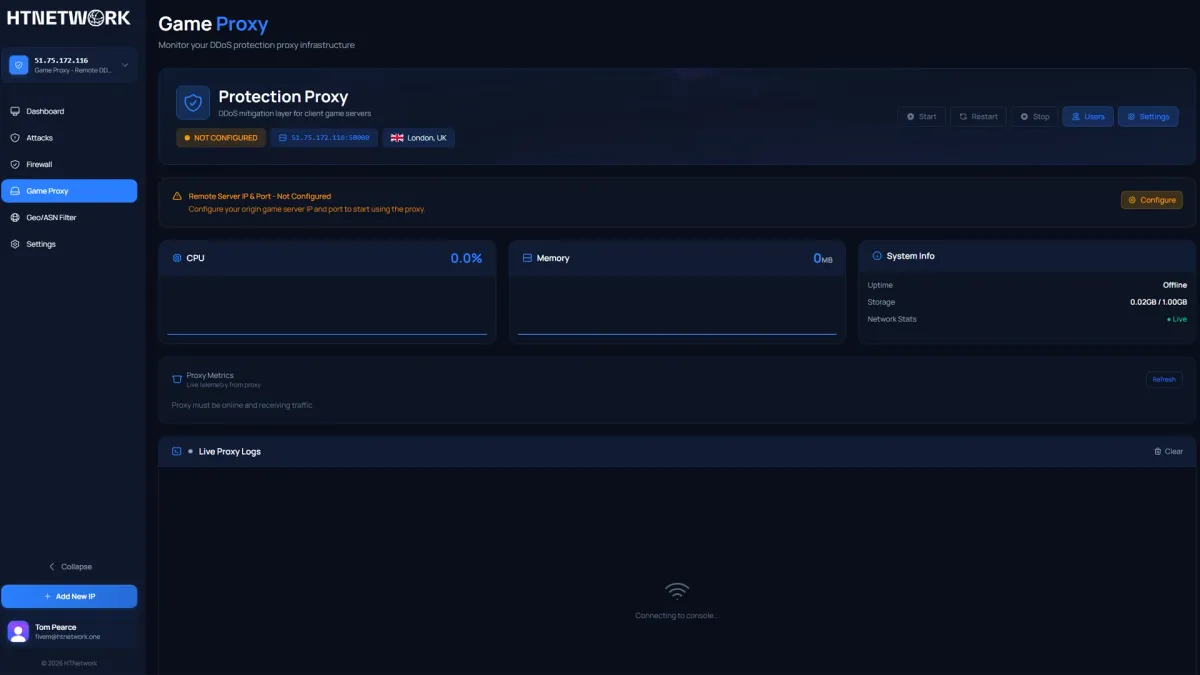
Before editing anything in your FiveM files, you must configure your Game Proxy inside the dashboard.
- Login to your dashboard
- Click Game Proxy on the left-hand menu
- You’ll see “Not Configured”
- Click Configure
You’ll now need to enter your real server IP and port.
🔎 Finding Your Real Server IP
If you don’t know your server’s IP:
- Google: “What is my IPv4 address”
- Make sure you use your IPv4 address (not IPv6)
⚠️ Important: You must use your IPv4 address or the proxy will not work correctly.
🔌 Default FiveM Port
FiveM’s default server port is:
30120
If you haven’t changed it, your port is likely 30120.
So you’ll enter:
- Actual Server IP: Your IPv4
- Port: 30120 (unless you use a custom port)
Save the configuration.
⚙️ Step 2: Add Proxy Settings to Your server.cfg
Once your proxy is configured, you need to tell FiveM to use it.
Open your server.cfg file and add the following:
set sv_forceIndirectListing true
set sv_proxyIPRanges "IP/32"
set sv_listingIpOverride "IP:PORT"
setr mumble_maxClientsPerIP 500
🔁 Replace With Your Proxy IP
You must replace:
IPwith your Game Proxy IPPORTwith your Game Proxy Port
For example:
If your DDoS Protection IP is:
15.235.134.117:50000
Your config will look like this:
set sv_forceIndirectListing true
set sv_proxyIPRanges "15.235.134.117/32"
set sv_listingIpOverride "15.235.134.117:50000"
setr mumble_maxClientsPerIP 500
🔒 What These Settings Do
sv_forceIndirectListing true
→ Forces your server to list through the proxy instead of exposing your real IP.sv_proxyIPRanges
→ Allows traffic from the proxy IP only.sv_listingIpOverride
→ Tells FiveM to show the proxy IP in the server browser.mumble_maxClientsPerIP 500
→ Prevents voice connection issues when many players connect through one proxy IP.
✅ Final Step: Restart Your Server
After saving your server.cfg:
- Restart your FiveM server
- Join using the proxy IP
- Confirm everything connects correctly
Your real server IP is now hidden and protected behind our DDoS-protected Game Proxy.
🛡️ Why Use a Game Proxy?
- Hide your real IP address
- Prevent direct DDoS attacks
- Improve stability
- Protect your infrastructure
- Keep your players online
If you experience any issues during setup, contact our support team and we’ll help you get protected in minutes.
Stay protected. Stay online. 🚀