What is the best way to host game servers locally?
Learn the best way to host a game server locally, including free manual setup, port forwarding, control panels, VPS hosting, and paid hosting options.
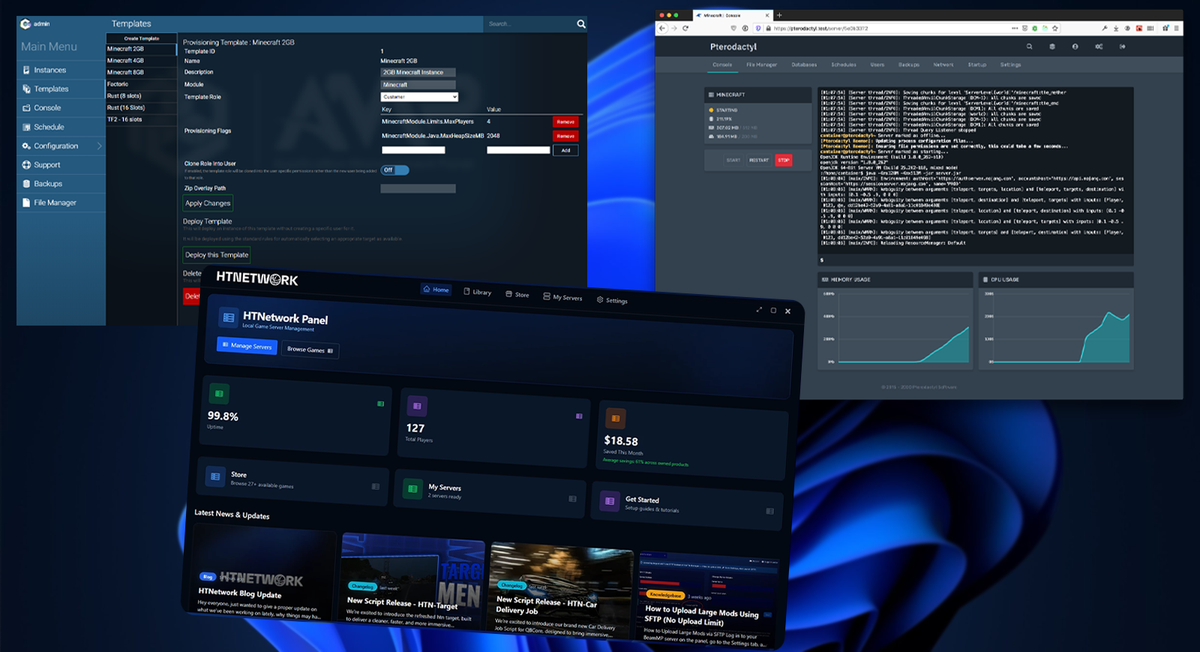
The best way to host a game server locally depends on what you are trying to run, how many players you expect, and how much control you want over the setup.
For a small private server with friends, you can usually host it from your own PC for free. For a modded server, development server, or long-term community, you will want something more organised: better hardware, wired internet, proper backups, and a control panel so you are not managing everything through random folders and command windows.
We have tested local hosting across different types of game servers, and the pattern is always the same. The first setup is usually easy. Keeping it clean, stable, updated, and manageable is where people start to struggle.
That is why there is no single “best” method for everyone.
The best setup is usually one of these:
| Setup | Best For |
|---|---|
| Manual local hosting | Free private servers and learning |
| Local hosting with a control panel | Easier management, mods, backups, and multiple servers |
| VPS hosting | 24/7 uptime, better networking, and public communities |
| Paid game hosting | People who want the least technical setup |
For most people, the best balance is local hosting with a game server control panel. You still run the server on hardware you control, but you avoid a lot of the mess that comes with manual hosting.
In this guide, we will compare the free and paid ways to host a game server locally, when manual setup is enough, when a VPS makes more sense, and how control panels like HTN Panel, AMP, and Pterodactyl compare.
Quick Answer: Best Local Game Server Hosting Setup
For a private server with friends, host it locally for free.
For anything modded, long-term, or public, use a control panel or VPS.
A good local game server setup usually includes:
- A modern PC, mini PC, or home server
- Wired Ethernet instead of Wi-Fi
- Enough RAM for the game, player count, and mods
- SSD or NVMe storage
- Correct port forwarding
- Firewall rules for only the ports you need
- Backups before making major changes
- A control panel if you want easier day-to-day management
Manual hosting is fine when the server is simple. Once you are editing configs, installing mods, restarting often, giving other people access, or running more than one server, a panel becomes worth it quickly.
What Does Hosting a Game Server Locally Mean?
Hosting a game server locally means the server runs on hardware you control instead of being fully hosted by a game server provider.
That could be:
- Your gaming PC
- A spare desktop
- A mini PC
- A home server
- A NAS-style machine
- A VPS you rent and manage yourself
The main difference is control.
With normal game server hosting, the provider gives you a server slot, a panel, and a monthly price. You usually do not have to worry about the machine, network, or operating system.
With local hosting, you control more of the setup. That can make it cheaper and more flexible, but it also means you need to understand the basics of server files, ports, firewalls, updates, backups, and uptime.
This is where a lot of people get caught out. Hosting locally is not just clicking “start server”. If people outside your house need to join, your network has to be configured properly too.
The Free Way: Manual Local Game Server Hosting
The cheapest way to host a game server locally is to do it manually.
This usually means:
- Downloading the dedicated server files
- Installing any required dependencies
- Editing the server config
- Starting the server with a command, script, or executable
- Opening the correct ports
- Allowing the server through your firewall
- Sharing your public IP or domain with players
For some games, this is fairly simple. For others, it can be painful.
Minecraft, Valheim, BeamMP, Vintage Story, FiveM, Rust, Palworld, Project Zomboid, and ARK-style servers all have their own setup methods, config structures, update systems, and mod handling.
Manual hosting is good when you want full control and do not mind learning how everything works.
It is not ideal if you want a clean way to manage servers day to day.
Pros of Manual Local Hosting
Manual local hosting can be a good option because:
- It can be completely free
- You control all files and settings
- There is no monthly hosting bill
- You learn how the server actually works
- You are not locked into a provider
- It is fine for small private servers
For a simple server with a few friends, manual hosting can work well.
If you only want to test a game, mess around with configs, or host one private session, you probably do not need anything complicated.
Cons of Manual Local Hosting
The downside is that everything becomes your job.
You have to deal with:
- Server crashes
- Updates
- Backups
- Mod installs
- Firewall problems
- Port forwarding
- Config mistakes
- File permissions
- Player access
- Restarting the server manually
This is where manual hosting starts to become annoying.
The actual server might run fine, but the process around it becomes messy. You end up with folders everywhere, random batch files, old backups, unclear configs, and no easy way to give someone else access without handing them more control than you should.
Manual hosting is not bad. It just does not scale well once the server becomes something you care about.
The Part People Underestimate: Port Forwarding
Port forwarding is usually the first real wall people hit when hosting a game server locally.
Your server can be running perfectly on your PC, but that does not mean your friends can connect from outside your house.
To make the server reachable online, you usually need to:
- Give your PC a static local IP
- Open the correct port on your router
- Allow the port through Windows Firewall
- Make sure the server is listening on the right port
- Check whether your ISP uses CGNAT
- Share your public IP or use a domain
This is why many self-hosting guides focus so heavily on router setup and port forwarding. It is still one of the most important parts of local multiplayer hosting. The referenced Instructables guide, for example, is built around getting a locally hosted multiplayer server reachable by forwarding ports through the router. (instructables.com)
The problem is that every router looks different. Every ISP is different. Some people do everything correctly and still cannot open ports because their ISP uses CGNAT.
That is why local hosting needs to be explained honestly.
It can be free, but free does not always mean easy.
Free Local Hosting vs Free Internet Hosting
There is a difference between hosting on your local network and hosting a server that people can join over the internet.
If everyone is in the same house, local hosting is usually simple. Players can often connect through the local network without much extra setup.
If your friends are joining from outside your house, you need to expose the server to the internet. That means port forwarding, firewall rules, and a stable enough internet connection.
Vintage Story’s self-hosting guide makes a similar distinction: free local hosting is normally easy but limited to players on the same local network, while internet hosting adds more setup and requires the host machine to stay running. (Vintage Story)
If you want to run a public server, you need to think about even more:
- Uptime
- Performance
- Upload speed
- Security
- DDoS protection
- Backups
- Player management
- Server restarts
- Remote access
That is why a setup that works fine for three friends may not be right for a public community.
What Hardware Do You Need to Host a Game Server Locally?
You do not always need a massive server rack to host games locally.
For most small servers, a decent modern PC, enough RAM, and fast storage are more useful than old enterprise hardware.
In general, you want:
- A CPU with good single-core performance
- Enough RAM for the game, mods, and player count
- SSD or NVMe storage
- A wired Ethernet connection
- Good upload speed
- A machine you can leave on when the server needs to be online
Game servers are not all the same.
Some servers barely use anything. Others can hammer the CPU and RAM once you add mods, scripts, vehicles, maps, plugins, or lots of players.
As a rough guide:
| Hardware | Best For |
|---|---|
| Gaming PC | Testing, friends, development servers |
| Spare desktop | Small private servers |
| Mini PC | Low-power home hosting |
| Home server | Multiple servers or heavier use |
| VPS | 24/7 public hosting |
| Dedicated server | Large communities or hosting businesses |
For most people, a modern PC or mini PC is enough for one or two private game servers.
Where people go wrong is trying to host too much on weak hardware, slow storage, or poor internet.
Internet Speed Matters More Than People Think
When hosting a game server locally, upload speed matters more than download speed.
A lot of home internet packages advertise fast download speeds, but the upload speed can be much lower. That upload speed is what your players are relying on when they connect to your server.
You also need to think about:
- Latency
- Packet loss
- Router quality
- Wi-Fi stability
- Other people using the same connection
- Whether your ISP blocks inbound traffic
- Whether your public IP changes
For a small private server, home internet can be fine.
For a public server, especially one where players expect it to be online all the time, a VPS or proper hosting setup is usually better.
What the Self-Hosting Market Looks Like
The market around local game server hosting is split into a few groups.
There are people who want the cheapest possible route and are happy to use SteamCMD, server files, config files, and port forwarding.
There are homelab users who want more control, often using mini PCs, Proxmox, Linux servers, containers, or panels.
There are community owners who start locally but eventually need better uptime, networking, security, and DDoS protection.
There are also people who do not want to touch any of this and would rather pay for normal game hosting.
That is why there are so many different answers online. In the referenced Reddit homelab discussion, the original poster had already moved from rented game servers to a KVM setup, but still found that many things did not go to plan and the setup was still expensive. (Reddit)
That is the real issue.
Local hosting is not just about whether it works. It is about whether it stays manageable.
When Should You Use a Game Server Control Panel?
You should use a game server control panel when manual hosting starts getting in the way.
A good panel makes it easier to:
- Deploy servers
- Start and stop servers
- Restart servers
- Edit files
- Manage backups
- Monitor resources
- Give access to other people
- Run multiple servers
- Keep everything organised
This is where HTN Panel, AMP, and Pterodactyl come in.
They all help manage game servers, but they are not aimed at exactly the same type of user.
HTN Panel: Local-First Game Server Hosting
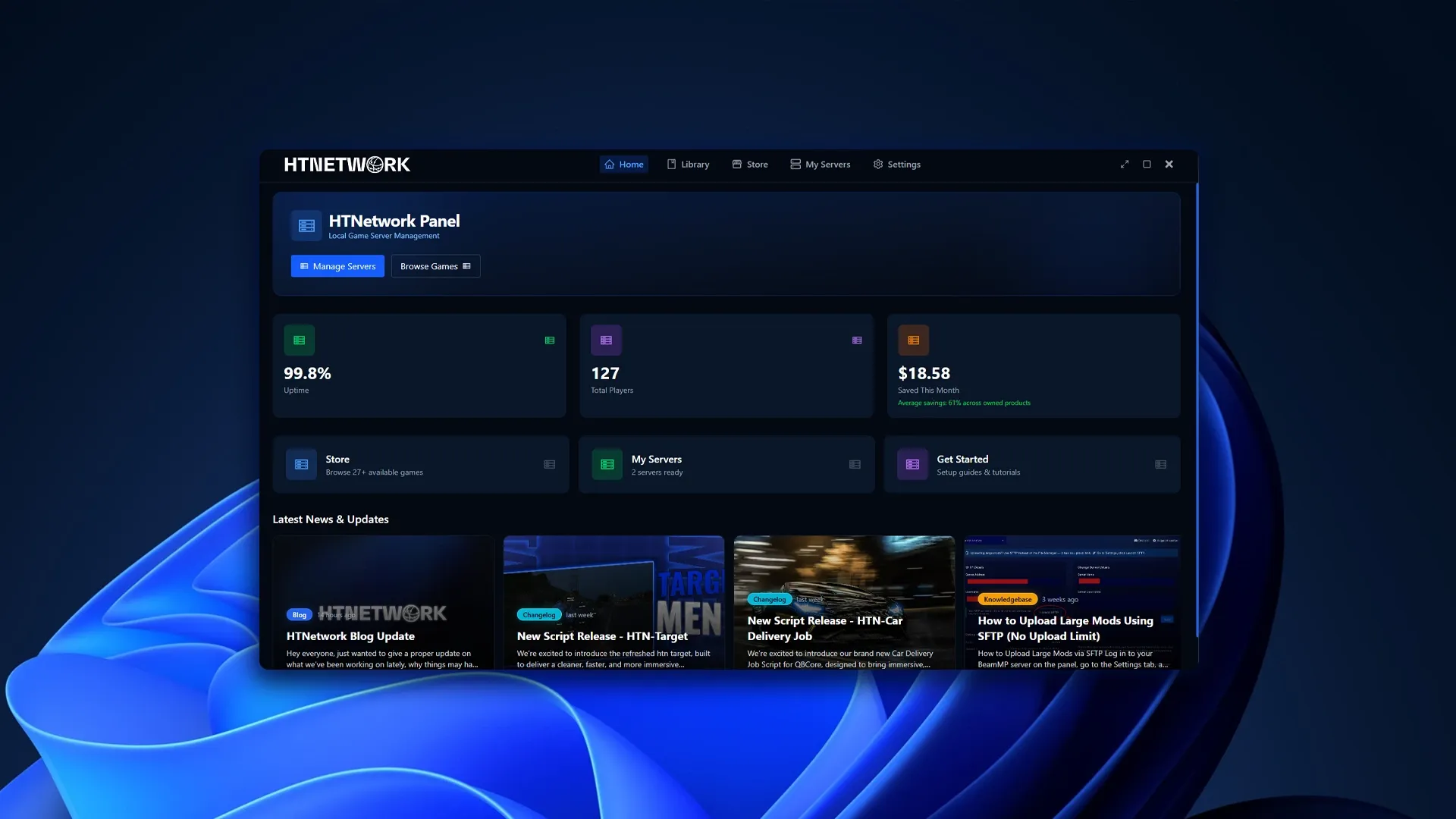
HTN Panel is a local-first game server control panel built for people who want to host game servers from their own machine without managing everything manually.
This is the middle ground between raw self-hosting and a full hosting-provider setup.
Manual hosting gives you control, but it can get messy once you start managing mods, backups, restarts, config files, and multiple servers.
Pterodactyl is powerful, but it is usually better suited to Linux servers, hosting providers, and more technical users.
AMP is a strong self-hosted panel, but it follows a more traditional server-management approach.
HTN Panel is designed for users who want a simpler local hosting workflow. You still run the server on hardware you control, but you get a cleaner way to deploy, manage, monitor, back up, and access your game servers.
It is a good fit for:
- Local Minecraft servers
- FiveM development servers
- BeamMP servers
- Modded test servers
- Private friend servers
- Small community servers
- Users who want to self-host without building a full server stack
HTN Panel makes the most sense when manual hosting feels too messy, but Pterodactyl or a full VPS setup feels like overkill.
Useful internal links:
AMP: Traditional Self-Hosted Game Server Management
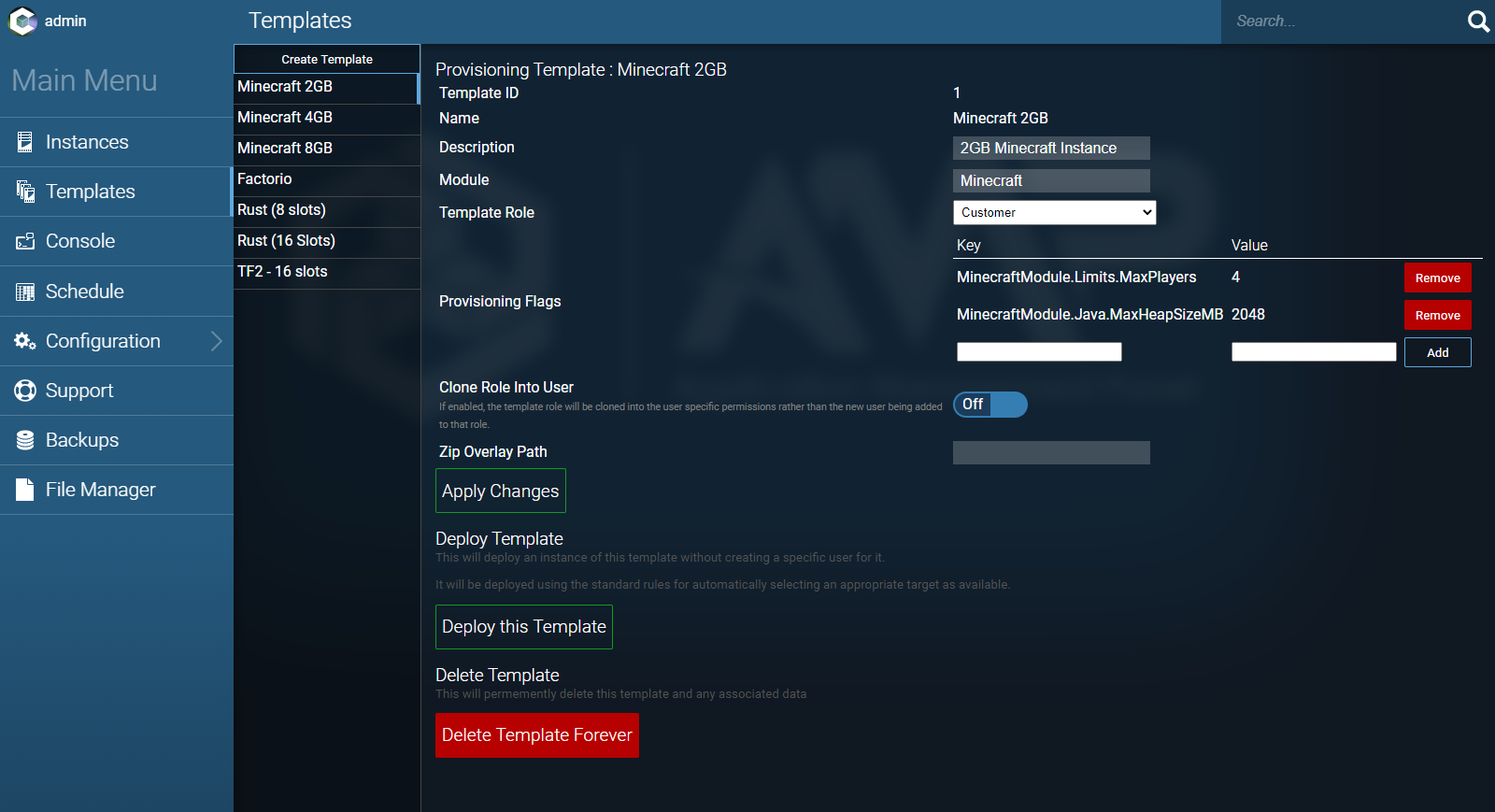
AMP is a paid self-hosted game server control panel from CubeCoders. It is positioned as a simple-to-use web control panel for game servers, with support for both Windows and Linux systems. (CubeCoders)
AMP makes sense if you want:
- A web-based control panel
- Windows and Linux support
- Multiple game server management
- A more traditional self-hosted setup
- An established paid panel
AMP is a good option for users who already understand the basics and want a cleaner way to manage servers.
Where AMP may not be the best fit is for users who want something that feels more focused on simple local game hosting. It is capable, but it can still feel like a broader server management product rather than a simple app-style local hosting experience.
Pterodactyl: Powerful, Open Source, and More Technical
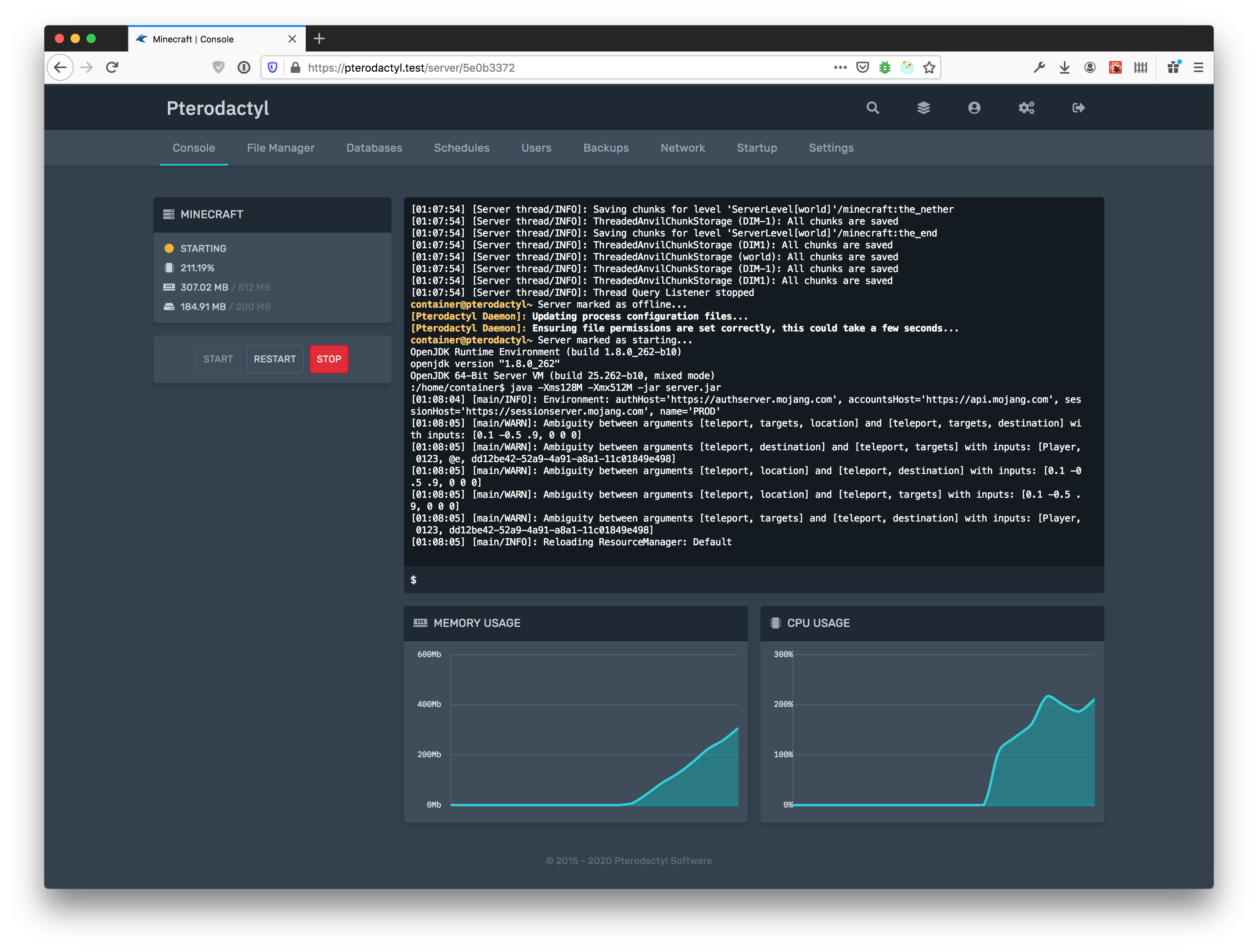
Pterodactyl is one of the most well-known open-source game server panels.
It is powerful, flexible, and widely used by hosting companies, communities, and technical users. Pterodactyl describes itself as a free, open-source game server management panel that runs game servers inside isolated Docker containers. (Pterodactyl)
Pterodactyl is best for:
- Hosting providers
- Linux users
- Larger communities
- People comfortable with Docker
- Users who want open-source software
- More advanced server environments
The downside is setup complexity.
If you are just trying to host a game server locally from your own PC, Pterodactyl is probably more than you need.
You need to understand things like:
- Linux server management
- Docker
- Wings
- Nodes
- Allocations
- Eggs
- Databases
- SSL
- Panel installation
- Permissions
For technical users, Pterodactyl is excellent.
For beginners or casual local hosting, it can be overkill.
HTN Panel vs AMP vs Pterodactyl
| Feature | HTN Panel | AMP | Pterodactyl |
|---|---|---|---|
| Best for | Simple local game server hosting | Traditional self-hosted game management | Advanced hosting environments |
| Beginner friendly | Yes | Medium | Lower |
| Local-first design | Yes | Not specifically | No |
| Good for home users | Yes | Yes | Possible, but technical |
| Good for hosting companies | Not the main focus | Possible | Yes |
| Requires Linux knowledge | No | Sometimes | Usually yes |
| Requires Docker knowledge | No | No/limited | Yes |
| Modern app-style experience | Yes | Less so | Web panel |
| Best for technical users | Good | Good | Excellent |
| Best for normal players | Excellent | Good | Not ideal |
| Best for paid hosting businesses | No | Maybe | Yes |
Which Panel Should You Choose?
Choose HTN Panel if you want a simpler way to host game servers locally from your own machine.
Choose AMP if you want a paid, traditional, self-hosted game server panel and you do not mind a more technical setup.
Choose Pterodactyl if you are technical, comfortable with Linux, and want a powerful open-source panel for more advanced hosting.
For most people searching for the best way to host a game server locally, the right answer is usually not the most complicated one.
Most people are not trying to build a hosting company.
They just want to run a server, manage it properly, and avoid spending hours fixing config files.
Local Hosting vs VPS Hosting
Local hosting is good when you want to use your own hardware.
A VPS is better when you want the server online all the time.
You should use a VPS if you need:
- 24/7 uptime
- Better upload speed
- A static public IP
- Better networking
- Better reliability
- Less dependence on home internet
- Better DDoS protection
- A server that stays online when your PC is off
This is especially important for public servers.
If you are running a serious FiveM server, a public Minecraft server, or a community that expects the server to always be available, a VPS is usually the smarter choice.
You can still keep control, but you are not relying on your home router, home upload speed, or personal PC.
Local Hosting vs Paid Game Hosting
Paid game hosting is the easiest option if you do not want to manage the machine.
It is best for people who want:
- Fast setup
- A hosted server
- Less technical work
- No port forwarding
- No home internet problems
- Provider support
The trade-off is control.
With paid game hosting, you usually get less freedom than a VPS or local setup. You are using someone else’s platform, limits, and configuration.
For some people, that is perfect.
For others, especially developers and modded server owners, it can feel restrictive.
The Best Option by Use Case
| Use Case | Best Option |
|---|---|
| Playing with friends in the same house | Basic local hosting |
| Playing with friends online | Manual local hosting or control panel |
| Hosting from your own PC | HTN Panel |
| Hosting a Minecraft server locally | HTN Panel or manual setup |
| Hosting a FiveM development server | HTN Panel or VPS |
| Hosting a serious FiveM community | VPS hosting |
| Running multiple technical servers | Pterodactyl |
| Running a homelab setup | AMP or Pterodactyl |
| Wanting the easiest hosted setup | Game hosting |
| Wanting maximum control | VPS |
| Wanting free hosting | Manual local hosting |
| Wanting simple local hosting | HTN Panel |
Free vs Paid: What Is Actually Worth Paying For?
Free local hosting is worth trying if you are technical or only hosting something small.
You can learn a lot from setting up a server manually.
But once you value your time, paid tools start to make sense.
You are not just paying for “hosting”.
You are paying to avoid:
- Repeating setup work
- Losing files
- Breaking configs
- Fighting firewall issues
- Manually restarting everything
- Explaining to friends how to access files
- Managing servers through messy folders
- Rebuilding servers from scratch
That is why a panel is usually the best middle ground.
You still control the server, but you do not have to manage it like it is 2012.
Common Mistakes When Hosting a Game Server Locally
Using Wi-Fi
Do not host a game server over Wi-Fi if you can avoid it.
Use Ethernet.
Wi-Fi can add instability, packet loss, and random lag spikes.
Ignoring Upload Speed
Your download speed is not enough.
Players are connecting to your server, which means your upload matters.
Using Slow Storage
Game servers can be sensitive to disk speed, especially modded servers.
Use an SSD or NVMe drive where possible.
Underestimating RAM
Modded Minecraft, FiveM, ARK, Palworld, Rust, and similar games can use a lot of RAM.
Leave headroom.
Opening Ports Without Thinking
Only open the ports you actually need.
Do not expose random services publicly.
Running Everything Manually Forever
Manual hosting is fine at first.
But if you are running servers regularly, use a panel.
Is Hosting a Game Server Locally Safe?
It can be safe if you know what you are exposing.
The main risk is opening ports on your home network without understanding what is running behind them.
Basic safety tips:
- Only open required ports
- Keep server software updated
- Use strong passwords
- Do not expose admin panels publicly without protection
- Avoid running unknown scripts
- Back up your server files
- Use a VPS for public communities
- Consider DDoS protection for serious servers
If you are hosting a private friend server, the risk is usually manageable.
If you are hosting a public server, especially for games like FiveM or Minecraft, you should take security and DDoS protection seriously.
Should You Host a Game Server Locally or Rent One?
Host locally if:
- You want to save money
- You want full control
- You enjoy tinkering
- You are hosting for friends
- You are testing or developing
- You have good hardware and internet
Rent hosting if:
- You want less work
- You need 24/7 uptime
- You do not want port forwarding
- You do not want to expose your home IP
- You need support
- You are running a public server
Use a VPS if:
- You want control and uptime
- You want better networking
- You want to run more than one service
- You need a static IP
- You want a more serious server environment
Final Verdict: What Is the Best Way to Host a Game Server Locally?
The best way to host a game server locally is not always the most advanced setup.
For a small private server, manual hosting is fine.
For a modded server, development server, or multiple servers, a control panel makes the setup much easier to manage.
For a public community, a VPS or paid hosting setup is usually the better long-term choice.
The simple answer is:
Start with local hosting if you want control and low cost.
Use a control panel when you want easier management.
Move to a VPS or paid hosting when uptime, performance, and protection matter.
For most people, the best balance is local hosting with a control panel. It keeps the freedom of self-hosting, but removes a lot of the mess that usually comes with running game servers manually.
That is where options like HTN Panel, AMP, and Pterodactyl all have a place.
The right choice depends on how technical you are, how serious the server is, and whether you want a simple local setup or a full server management environment.



