AMP Control Panel Alternative for Game Server Hosting | HTN Panel
Looking for an AMP control panel alternative? HTN Panel is a modern game server control panel for hosting, managing, monitoring, and controlling game servers locally from your own PC.
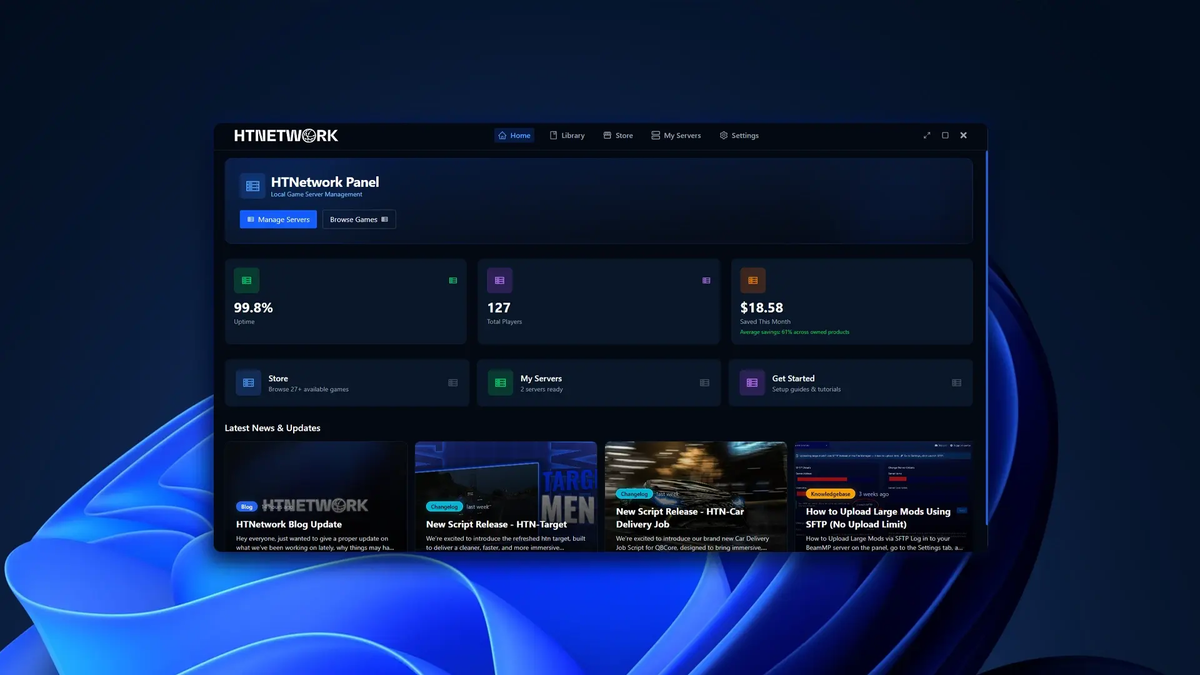
If you are searching for an AMP control panel, there is a good chance you are trying to host and manage your own game server.
Maybe you want to host a Minecraft server from your own PC.
Maybe you are setting up a FiveM, BeamMP, ETS2, ATS, or RedM server.
Or maybe you are tired of paying monthly game hosting fees and want a better way to use the hardware you already own.
AMP is a known option in the game server control panel space, but it is not always the easiest or most modern experience for people who just want to host locally.
The setup can require technical experience, the interface can feel dated, and the overall experience can be confusing if you are not already familiar with game server management.
That is why we built HTN Panel.
HTN Panel is a modern game server control panel designed to make local game server hosting easier, cleaner, and more beginner-friendly.
Instead of dealing with outdated-looking tools, confusing setup steps, or expensive monthly hosting, HTN Panel lets you host supported game servers locally from your own PC through a simple modern panel.
Download HTN Panel here:
https://panel.htnetwork.one/
View supported games here:
https://panel.htnetwork.one/store
What Is AMP Control Panel?
AMP, also known as Application Management Panel, is a self-hosted control panel used for managing game servers.
People usually search for AMP control panel because they want software that helps them host and control game servers without doing everything manually.
A good game server control panel should help with things like:
- Installing game servers
- Starting and stopping servers
- Restarting servers
- Managing server files
- Monitoring server status
- Managing multiple games
- Making server hosting easier overall
AMP can do a lot, but it is not always ideal for beginners or users who simply want a clean local hosting experience.
For many people, AMP can feel more complicated than it needs to be.
That is where HTN Panel comes in.
What Is HTN Panel?
HTN Panel is a modern local game server panel that lets you host, deploy, manage, monitor, and control game servers from your own PC.
It is built for people who want to self-host game servers locally without dealing with complicated setup processes or old-feeling software.
The idea is simple:
You install HTN Panel, choose a supported game, deploy your server, and manage it from one clean interface.
HTN Panel is designed for gamers, communities, developers, and server owners who want more control without making local hosting difficult.
Why Look for an AMP Control Panel Alternative?
AMP is a recognised name, but that does not mean it is the right option for everyone.
A lot of users searching for an AMP alternative are looking for something that feels:
- Easier to set up
- More modern
- Less confusing
- Better suited for local hosting
- More beginner-friendly
- Cleaner to use day-to-day
The biggest issue with AMP is that it can feel like software built for people who already know what they are doing.
If you are experienced with server management, that might be fine.
But if you just want to host a Minecraft server, FiveM server, BeamMP server, or simulator server from your own PC, you probably do not want to spend hours learning how the panel works before you can even start hosting.
HTN Panel is built to remove that friction.
It gives you a simple local game server control panel with the tools you actually need, without making the experience feel technical, outdated, or confusing.
AMP Control Panel vs HTN Panel
| Feature | AMP Control Panel | HTN Panel |
|---|---|---|
| Main use case | ⚠️ Traditional self-hosted game server management | ✅ Modern local game server hosting from your own PC |
| Setup difficulty | ❌ Requires more technical experience | ✅ Built to be simple for everyday users |
| Beginner friendly | ❌ Can be confusing for new users | ✅ Yes |
| Local hosting focus | ⚠️ Possible, but not as clean or simple | ✅ Yes, built around local hosting |
| User interface | ❌ Old-feeling and dated | ✅ Modern app-style experience |
| Game deployment | ⚠️ Supported, but setup can still be confusing | ✅ Simple game deployment through the panel |
| File manager | ✅ Yes | ✅ Yes |
| Server monitoring | ✅ Yes | ✅ Yes |
| Built-in backups | ❌ Not a simple core local hosting feature | ✅ Built into HTN Panel |
| Remote access for team members | ❌ Not a simple built-in local hosting feature | ✅ Built into the HTN Panel experience |
| Best for | ⚠️ More technical users who do not mind older software | ✅ Gamers, beginners, communities, and local hosts |
HTN Panel is not trying to be another complicated server admin tool.
It is built for people who want a clean, modern, and simple way to host game servers from their own PC.
Why HTN Panel Is a Better Fit for Local Game Server Hosting
Local hosting should not feel like a technical project.
If you already have a capable PC, you should be able to use that hardware to host your own game servers without needing a confusing setup process.
HTN Panel focuses on making that experience easier.
Instead of forcing users through a complicated control panel setup, HTN Panel is designed to feel more like a modern app.
You open the panel, choose your game, deploy your server, and manage it from one place.
That makes it a strong option for anyone searching for an AMP control panel alternative or a more modern game server control panel.
Key Features of HTN Panel
1. Host Game Servers From Your Own PC
HTN Panel lets you host supported game servers locally from your own computer.
This means you can use the hardware you already own instead of renting a hosted game server every month.
For many users, local hosting can be a much cheaper and more flexible option.
You stay in control of your own files, your own machine, and your own server setup.
2. Simple Game Server Deployment
Manually setting up a game server can be annoying.
You may need to download server files, create folders, edit configs, run commands, check ports, and troubleshoot errors before your server even launches.
HTN Panel makes the process simpler.
Choose a supported game, deploy it through the panel, and manage it from one modern interface.
This is one of the main reasons HTN Panel is a strong game server control panel for local hosting.
3. Built-In File Manager
A proper game server control panel needs a proper file manager.
HTN Panel includes a built-in file manager so you can manage your server files directly through the panel.
This is useful for:
- Editing config files
- Uploading resources
- Managing worlds
- Changing server settings
- Organising folders
- Updating server files
Instead of manually digging through your PC every time you need to change something, you can manage your server files from inside HTN Panel.
4. Built-In Backups
Backups are one of the most important parts of running a game server.
If a world corrupts, a config breaks, or a resource causes problems, having a backup can save your server.
HTN Panel includes backups as part of the local hosting experience, making it easier to protect your server files.
This is especially useful for:
- Minecraft worlds
- FiveM resources
- BeamMP configurations
- ETS2 and ATS server files
- RedM servers
- Any game where your files and progress matter
5. Server Monitoring
HTN Panel helps you monitor your server from inside the panel.
You can keep track of your server status and see what is happening without needing to rely on manual checks or separate tools.
For local game server hosting, this makes day-to-day management much easier.
6. Start, Stop, and Restart Servers Easily
One of the most basic things a game server control panel should do is make server control simple.
HTN Panel lets you start, stop, and restart your game servers through the panel.
No messy commands.
No hunting through folders.
No complicated process just to restart your server.
7. Remote Access for Trusted Users
One of the biggest problems with local hosting is letting other people help manage the server.
If your server is running from your PC, you usually do not want to give someone full access to your machine.
HTN Panel solves this with remote access features.
You can allow trusted users to help manage your server without giving them direct access to your whole PC.
This is useful for:
- Friends
- Developers
- Server staff
- Community managers
- Co-owners
For communities, this is a major advantage.
You can host locally while still allowing the right people to help manage the server remotely.
8. A Modern App-Style Experience
A game server control panel should not feel old, clunky, or confusing.
HTN Panel is designed to feel modern and easy to use.
The goal is to make local game server hosting feel accessible to normal users, not just people with server admin experience.
If you have ever looked at AMP and thought it felt outdated or confusing, HTN Panel is built to be the cleaner alternative.
Traditional Game Hosting vs AMP Control Panel vs HTN Panel
| Feature | Traditional Game Hosting | AMP Control Panel | HTN Panel |
|---|---|---|---|
| Host from your own PC | ❌ No | ⚠️ Possible, but setup can be technical | ✅ Yes |
| Monthly hosting fee | ❌ Usually yes | ⚠️ No hosting fee, but software/licensing may apply | ✅ No traditional hosting fee for local hosting |
| Setup difficulty | ✅ Usually handled by the host | ❌ Requires experience | ✅ Built to be simple |
| Beginner friendly | ⚠️ Simple, but limited | ❌ Can be confusing | ✅ Yes |
| Full hardware control | ❌ No | ⚠️ Yes, depending on setup | ✅ Yes |
| File manager | ⚠️ Usually yes | ✅ Yes | ✅ Yes |
| Backups | ⚠️ Often limited or paid | ❌ Not a simple core local hosting feature | ✅ Built in |
| Remote team access | ⚠️ Usually via host panel | ❌ Not a simple built-in local hosting feature | ✅ Built in |
| Local-first design | ❌ No | ⚠️ Not fully | ✅ Yes |
| Interface style | ⚠️ Depends on host | ❌ Older traditional panel feel | ✅ Modern app-style panel |
| Best for | Managed hosting users | Technical users | ✅ Simple local hosting |
Traditional hosting is useful if you want someone else to manage the infrastructure.
AMP can work for technical users who are happy with a more traditional setup.
HTN Panel is built for users who want simple local hosting from their own PC.
Is HTN Panel Better Than AMP?
For local game server hosting, yes, HTN Panel is built to be the easier and more modern option.
AMP can still make sense for users who are experienced and do not mind a more technical setup.
But for everyday users, AMP can feel old, confusing, and harder to use than it needs to be.
HTN Panel is built for a different experience.
It is designed for users who want to host game servers locally without turning it into a complicated server admin project.
Choose HTN Panel if you want:
- A modern local game server panel
- Easier setup
- A cleaner interface
- Game server hosting from your own PC
- Built-in file management
- Built-in backups
- Server monitoring
- Remote access for trusted users
- A panel made for gamers and communities
Supported Games on HTN Panel
HTN Panel supports a growing range of popular games, with more being added over time.
You can browse the full HTN Panel store here:
https://panel.htnetwork.one/store
Popular HTN Panel game pages include:
Minecraft:
https://panel.htnetwork.one/store/minecraft
FiveM:
https://panel.htnetwork.one/store/fivem
BeamMP:
https://panel.htnetwork.one/store/beammp
Euro Truck Simulator 2:
https://panel.htnetwork.one/store/ets2
American Truck Simulator:
https://panel.htnetwork.one/store/ats
RedM:
https://panel.htnetwork.one/store/redm
Whether you are hosting a Minecraft world, FiveM roleplay server, BeamMP session, or simulator community, HTN Panel gives you a simpler way to host locally.
AMP Control Panel Alternative for Minecraft Servers
Many people searching for AMP are trying to host a Minecraft server.
HTN Panel is a strong option for Minecraft users who want a simpler local setup.
Instead of renting a Minecraft server every month or manually setting everything up, HTN Panel gives you a cleaner way to host and manage Minecraft from your own PC.
You can deploy your server, manage files, monitor it, back it up, and control it from one panel.
View Minecraft on HTN Panel:
https://panel.htnetwork.one/store/minecraft
AMP Control Panel Alternative for FiveM Servers
FiveM server owners often need a reliable way to manage resources, files, configs, and restarts.
HTN Panel gives FiveM users a local game server control panel designed to make server management easier.
It is useful for testing, developing, editing resources, and running a server locally with more control.
View FiveM on HTN Panel:
https://panel.htnetwork.one/store/fivem
AMP Control Panel Alternative for BeamMP Servers
BeamMP is another great use case for local hosting.
With HTN Panel, you can host and manage a BeamMP server locally from your own PC without making the setup more complicated than it needs to be.
View BeamMP on HTN Panel:
https://panel.htnetwork.one/store/beammp
AMP Control Panel Alternative for ETS2 and ATS Servers
Euro Truck Simulator 2 and American Truck Simulator communities can also benefit from a simpler local hosting setup.
HTN Panel makes it easier to manage simulator servers from your own PC through a cleaner game server control panel experience.
View ETS2 on HTN Panel:
https://panel.htnetwork.one/store/ets2
View ATS on HTN Panel:
https://panel.htnetwork.one/store/ats
Who Should Use HTN Panel?
HTN Panel is ideal for:
- Gamers hosting private servers for friends
- Minecraft players who want to self-host
- FiveM owners testing or building locally
- BeamMP players hosting sessions
- ETS2 and ATS communities
- RedM server owners
- Developers testing game servers
- Small communities wanting to reduce monthly hosting costs
- Users looking for an AMP alternative
- Anyone searching for a modern game server control panel
If you want to host a game server from your own PC and manage it through a clean panel, HTN Panel is built for you.
Why Local Game Server Panels Are Becoming More Popular
More server owners are looking for ways to reduce costs and gain more control.
Traditional game hosting is convenient, but it usually means paying every month.
Manual self-hosting gives you control, but it can be confusing and time-consuming.
A local game server control panel gives you a better middle ground.
You can host on your own hardware while still using a proper interface to manage your server.
That is why HTN Panel exists.
It makes self-hosting easier for normal users.
Why a Modern Game Server Control Panel Matters
Game server hosting has changed.
People expect software to be clean, fast, and easy to understand.
A control panel should not feel like something from years ago.
It should not make simple tasks feel complicated.
It should help you get your server online faster and manage it with less stress.
HTN Panel is built around that idea.
It takes the key features server owners need and puts them into a modern local hosting experience.
Frequently Asked Questions
What is the best AMP control panel alternative?
HTN Panel is a strong AMP control panel alternative for users who want to host game servers locally from their own PC.
It focuses on simple setup, a modern interface, built-in file management, backups, server monitoring, and remote access.
What is a game server control panel?
A game server control panel is software that helps you manage game servers through an interface.
It usually includes tools for starting servers, stopping servers, restarting servers, editing files, monitoring status, managing users, and handling server settings.
Can I host game servers on my own PC?
Yes.
HTN Panel lets you host supported game servers locally from your own PC, giving you more control over your files, hardware, and setup.
Is HTN Panel like AMP?
HTN Panel and AMP are both related to game server management, but they are built for different experiences.
AMP is a more traditional self-hosted control panel, while HTN Panel is focused on simple local game server hosting from your own PC with a modern app-style experience.
Is AMP hard to set up?
AMP can require more technical experience than some users expect.
For people who are new to game server hosting, the setup and interface can feel confusing.
HTN Panel is designed to make local hosting easier and more beginner-friendly.
Does HTN Panel support Minecraft?
Yes.
HTN Panel supports Minecraft server hosting.
View the Minecraft page here:
https://panel.htnetwork.one/store/minecraft
Does HTN Panel support FiveM?
Yes.
HTN Panel supports FiveM server hosting.
View the FiveM page here:
https://panel.htnetwork.one/store/fivem
Does HTN Panel support BeamMP?
Yes.
HTN Panel supports BeamMP server hosting.
View the BeamMP page here:
https://panel.htnetwork.one/store/beammp
Do I need monthly game hosting with HTN Panel?
HTN Panel is designed to reduce the need for traditional monthly game hosting by letting you host supported servers locally from your own PC.
Is HTN Panel good for beginners?
Yes.
HTN Panel is built to make local game server hosting easier for everyday users, not just experienced server admins.
Final Thoughts: The Modern AMP Control Panel Alternative
If you are searching for an AMP control panel or a game server control panel, HTN Panel is worth checking out.
AMP is a known option, but it can feel old, technical, and confusing for users who just want to host game servers locally.
HTN Panel is built to be the modern alternative.
It gives you a cleaner way to host game servers from your own PC, with tools for deployment, file management, backups, monitoring, restarts, and remote access.
For users who want control without complicated setup, HTN Panel makes self-hosted game servers much easier.
Whether you are hosting Minecraft, FiveM, BeamMP, ETS2, ATS, RedM, or another supported game, HTN Panel gives you a modern way to manage your server locally.
Download HTN Panel here:
https://panel.htnetwork.one/
Browse supported games here:
https://panel.htnetwork.one/store



